
# Guide
# Introduction
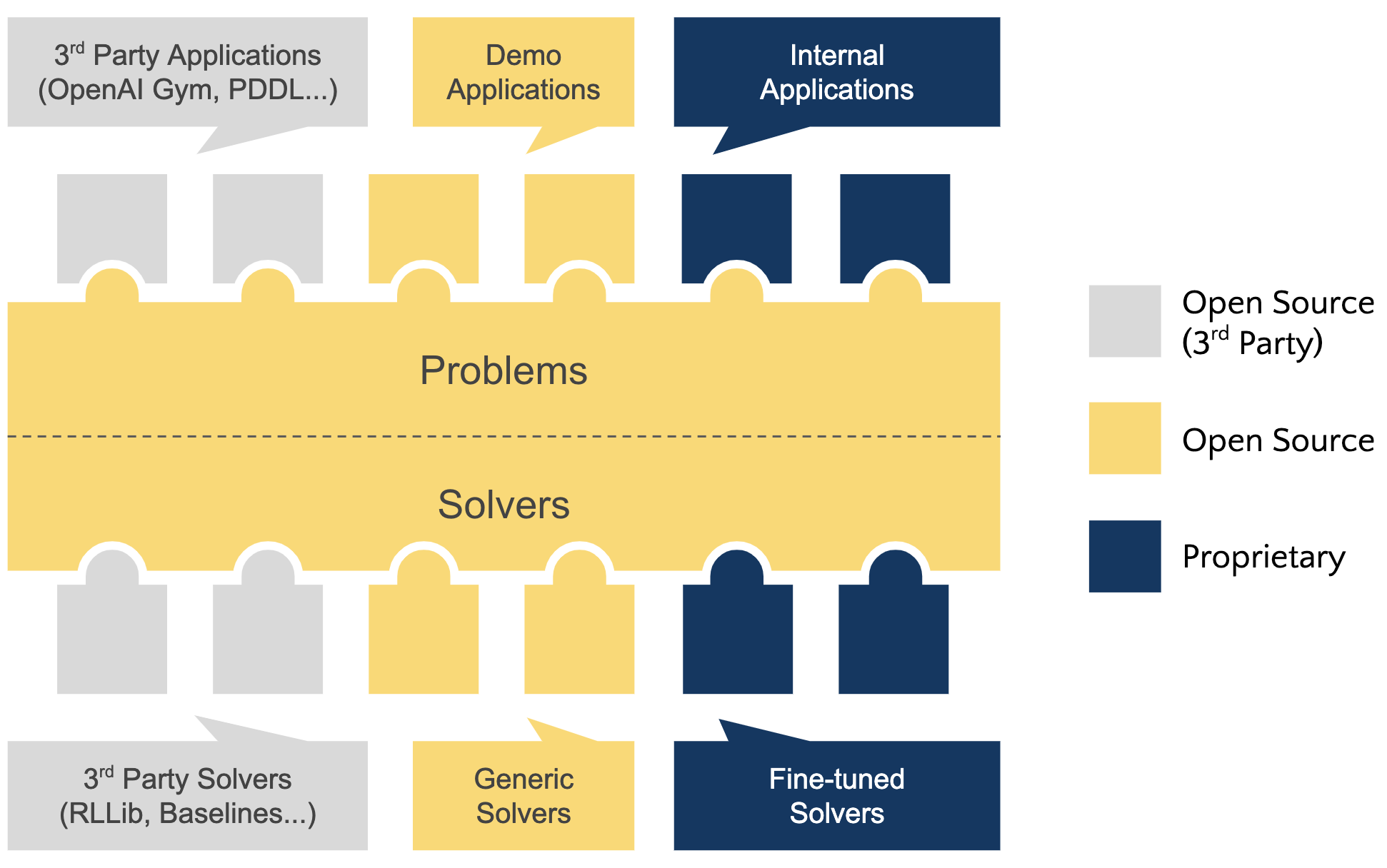
Scikit-decide is an AI framework for Reinforcement Learning, Automated Planning and Scheduling.
It is meant for being a one-stop shop solution to formalize decision-making problems, finding compatible solvers among a growing catalog and get the best solution possible. The catalog is a combination of wrapped existing domains/solvers and newly contributed ones.
# Domain characteristics
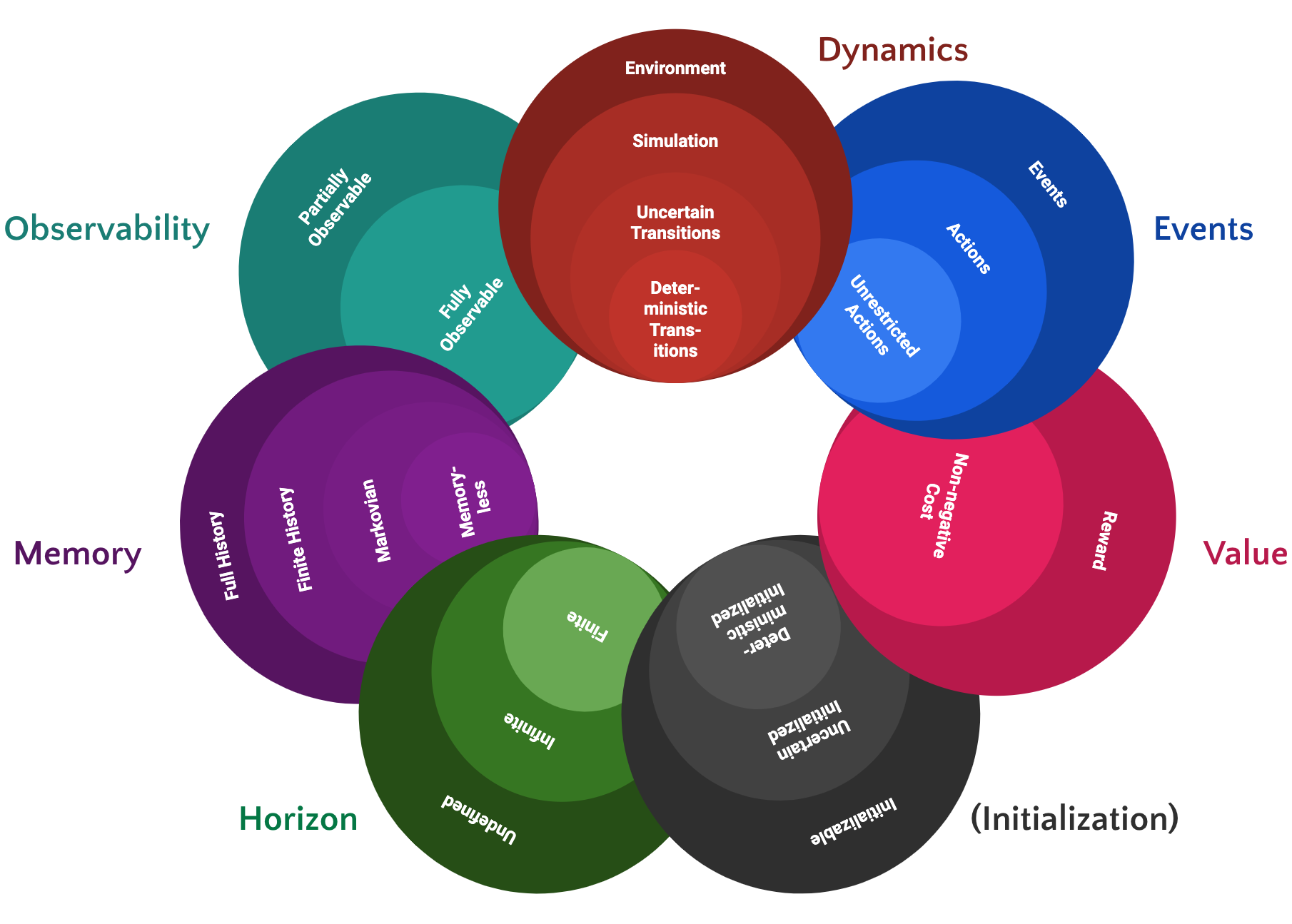
Domain characteristics are one of the key concepts in scikit-decide: they are combined on the one hand to define domains, on the other hand to specify the envelope of domains a solver can tackle.
Each characteristic has various levels, from general (high-level) to specialized (low-level) ones, each level inheriting higher-level functions. Any domain fully contained in a solver's envelope is compatible with this solver, unless it violates additional requirements (optional).
# Getting started
In the next subsections, we present how to find compatible solvers and compute a solution, once a domain is defined.
WARNING
Exact prints and outputs may vary depending on which domains/solvers are registered on your system.
# Select a domain to solve
This step can be skipped if a domain has already been defined. Otherwise, here is how to load one from the catalog of registered domains:
from skdecide import utils

print(utils.get_registered_domains())
# prints: ['GymDomain', 'MasterMind', 'Maze', 'RockPaperScissors', ...]

MyDomain = utils.load_registered_domain('Maze')
# Find compatible solvers
This step can be skipped if a solver is already known to be compatible and selected as best candidate. Otherwise, here is how to find all compatible solvers:
compatible_solvers = utils.match_solvers(MyDomain())
print(compatible_solvers)
# prints: [<class 'skdecide.hub.solver.p_astar.p_astar.Astar'>, ...]

# select Python A* solver and instanciate with default parameters
from skdecide.hub.solver.p_astar import Astar
mysolver = Astar(domain_factory=MyDomain)
# Compute a solution
Here is how to solve MyDomain with mysolver:
mysolver.solve()
# Test the solution
# Simple case (one basic rollout)
utils.rollout(MyDomain(), mysolver)

# Example of additional rollout parameters
utils.rollout(MyDomain(), mysolver, num_episodes=3, max_steps=1000, max_framerate=30)
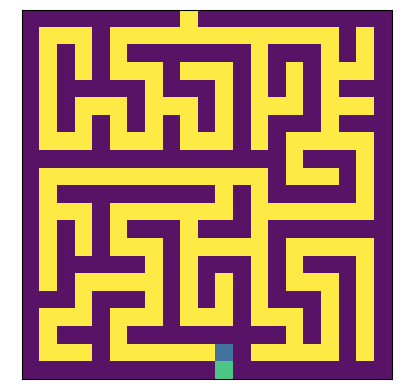
In the example of the Maze solved with Lazy A*, the goal (in green) should be reached by the agent (in blue):
TIP
The rendering of the maze is done in a separate window when running in a local python script. To get a similar result in a jupyter notebook, add a line
%matplotlib qt
before calling rollout(). See also the available tutorial notebooks
to know how to render the maze inline.
# Clean up the solver
Some solvers (especially parallel C++ ones) need to be properly cleaned once used.
mysolver._cleanup()
TIP
Note that this is automatically done if you use the solver within a with statement:
with Astar(domain_factory=MyDomain) as mysolver:
    mysolver.solve()
    utils.rollout(MyDomain(), mysolver)
# Going further
# As a domain developer
Scikit-decide supports formalizing the problem one characteristic at a time without the need of being an algorithmic expert nor knowing in advance the best kind of solver for this task (RL, planning, scheduling or any hybrid type). See above the domain characteristics diagram for more details.
Defining a domain to solve is a matter of:
- selecting a base domain class (
Domainby default or any pre-made template for typical combinations likeDeterministicPlanningDomain) - fine-tuning any necessary characteristic level with something more specialized (lower-level)
- auto-generating the code skeleton from the combination above (technically by implementing all abstract methods)
- filling the code as needed based on domain expertise
TIP
When starting a new domain, it is highly recommended to check the code generators for assistance and auto-generation of the skeleton to fill.
You can find 2 tutorials on how to write a new domain in the notebooks page:
# As a solver developer
Scikit-decide provides a meaningful API to interact with domains at the expected level of information, as well as a catalog of domains to test/benchmark new algorithms.
Defining a solver is a matter of:
- defining the needed characteristics from the domain to solve (see the domain characteristics diagram for more details)
- selecting the necessary solver characteristics
- auto-generating the code skeleton from the combination above (technically by implementing all abstract methods)
- filling the code as needed
TIP
When starting a new solver, it is highly recommended to check the code generators for assistance and auto-generation of the skeleton to fill.
You can find a tutorial on how to write a new solver in the notebooks page:
- Implementing a depth-first-search solver,
- Implementing a RDDL solver, which is the follow-up of the one implementing a RDDL domain.
# Examples
# Notebooks
Go to the dedicated Notebooks page to see a curated list of notebooks recommended to start with scikit-decide.
# Python scripts
More examples can be found in the examples/ folder, showing how to import or define a domain, and how to run or solve it. Most of the examples rely on scikit-decide Hub, an extensible catalog of domains/solvers.
# Playground
The best example to try out scikit-decide capabilities might be examples/full_multisolve.py. This interactive console experience makes it easy to pick a domain among a pre-defined catalog selection:
- Simple Grid World
- Maze
- Mastermind
- Cart Pole (Gymnasium)
- Mountain Car continuous (Gymnasium)
- ATARI Pacman (Gymnasium)
...and then solve it with any compatible solver (detected automatically) among following selection:
- Random walk
- Simple greedy
- Lazy A* (classical planning)
- PPO: Proximal Policy Optimization (deep reinforcement learning)
- POMCP: Partially Observable Monte-Carlo Planning (online planning for POMDP)
- CGP: Cartesian Genetic Programming (evolution strategy)
- IW: Iterated Width search (width-based planning)
Note: some requirements declared in above solvers still need fine-tuning, so in some cases an auto-detected compatible solver may still be unable to solve a domain (for now).
These combinations are particularly efficient if you want to try them out:
- Simple Grid World -> Lazy A*
- Maze -> Lazy A*
- Mastermind -> POMCP: Partially Observable Monte-Carlo Planning
- Cart Pole -> PPO: Proximal Policy Optimization
- Mountain Car continuous -> CGP: Cartesian Genetic Programming
- ATARI Pacman -> Random walk
WARNING
Some domains/solvers might require extra manual setup steps to work at 100%. In the future, each scikit-decide hub entry might have a dedicated help page to list them, but in the meantime please refer to this:
- Gym/Gymnasium domains: Gymnasium documentation (opens new window) for loading Gym environments not included by default (e.g. atari games).
# Code generators
Go to Code generators for assistance when creating a new domain or solver.
# Roadmap
Following features will be added to scikit-decide soon:
- Scheduling API
- PDDL parser