Writing a component (advanced)
A component is Sen's unit of execution. It has an interface, your logic, and a thread to run it in. Every Sen application has them, so the question is never whether you want a component. It is whether you write one.
Most of the time you do not. You write packages, libraries of your classes holding your
implementations, and the kernel builds a component for you from a configuration file, importing
those packages and instantiating your objects. That is what the build: section of a configuration
does, and it is the easiest and most flexible way to get a component.
Create your first package is where that starts.
The other way is to write the component yourself, in C++, and name it under load:. Such a
component is still a package, built with add_sen_package(... IS_COMPONENT), that additionally
exports a class deriving from sen::kernel::Component. What it buys you is the thread
and the execution loop, and that is the only reason to reach for it.
This page is about that second way. The section below is how to tell whether you need it.
Do you need to write one?
Write the component yourself when you have to own something the kernel cannot own for you.
| You need to own | Because | Shipped example |
|---|---|---|
| An external event loop | Something else wants to run the loop, and it will not yield to a cycle | ether runs an ASIO io_context |
| A process-wide resource with its own lifetime rules | It must be created and destroyed on one thread, once | py owns a pybind11::scoped_interpreter |
| A terminal or a listening socket | Blocking I/O has to happen somewhere | term serves a REPL, jsonrpc a socket |
| A sampling loop that creates its objects from configuration | The objects are not known until the configuration is read | recorder, influx, logmaster |
If none of those describe what you are building, let the kernel build the component: write a package and instantiate your objects from configuration. An object can already publish itself, discover other objects, call their methods, react to their events and do work every cycle, and it gets all of that without you owning a thread.
The components Sen ships are all in the table's territory (transport, persistence, tooling and scripting), and none of them models a domain, because a domain is what packages and objects are for. The component list has the current set.
The component lifecycle
A component you write is a class deriving from sen::kernel::Component. Every hook has a default,
so you implement only the ones you need.
  /// Preload the component and initialize all self-contained resources.
  /// This function is just called once.
  virtual FuncResult preload(PreloadApi&& /* api */) { return Ok(); }

  /// Load the component and initialize all self-contained resources.
  /// This function is just called once.
  virtual FuncResult load(LoadApi&& /* api */) { return Ok(); }

  /// Initialize the component and perform kernel-related operations.
  /// This may include dependency resolution, and resource registration.
  /// This function will be continuously called until it returns that it's done.
  virtual PassResult init(InitApi&& /* api */) { return done(); }

  /// Runs the component in a dedicated thread.
  /// This function is called once and only when the kernel
  /// has reached the desired group of this component.
  /// Implementations shall end the execution thread when
  /// the stopFlag is set to true.
  virtual FuncResult run(RunApi& /* api */) { return Ok(); }

  /// Unload any self-contained resources.
  /// This function is just called once.
  virtual FuncResult unload(UnloadApi&& /* api */) { return Ok(); }

  /// Do an additional (and final) clean up step after unloading the component.
  /// This function is just called once for all components and independently of the chosen group.
  virtual void postUnloadCleanup() {}

  /// Return true here if your component is not designed to work with virtualized time.
  [[nodiscard]] virtual bool isRealTimeOnly() const noexcept { return false; }
init(), preload() and run() need more explanation than the rest.
init() gets called repeatedly. It returns PassResult, and the kernel keeps calling it until it
reports that it is done, which is how a component waits for something without blocking. The helpers
done() and delay(Duration) build those two answers.
preload() runs for every component before any of them is loaded. load(), init() and run()
all happen one group at a time in group order, so preload() is the place for anything the whole
process needs before the rest starts.
run() is the one that gets a thread. Your component is running until it returns, and it should
return once RunApi::stopRequested() becomes true.
Do not call exit(), _Exit() or quick_exit() from a component. Every component shares the
process, so ending it takes the others down with no chance to shut down, and a component that owns
the terminal cannot put it back. Ask the kernel to stop instead, with RunApi::requestKernelStop().
A component that only installs a hook
The smallest components have no run() at all. tracy exists to install a tracer factory
before anything else loads, and to tear it down afterwards:
struct TracyComponent final: ::sen::kernel::Component
{
  [[nodiscard]] ::sen::kernel::FuncResult preload(::sen::kernel::PreloadApi&& api) override
  {
    // Started once per process, and never shut down. Every kernel thread and every other component can
    // plot through the tracer installed below, and shutdown unloads this component's group before the
    // lower groups stop running, so a profiler released on unload would be gone while the kernel's own
    // runner was still plotting into it.
    static std::once_flag profilerStarted;
    std::call_once(profilerStarted, []() { ::tracy::StartupProfiler(); });  // NOLINT(misc-include-cleaner)

    api.installTracerFactory([](auto name) { return std::make_unique<TracyTracer>(name); });
    return ::sen::Ok();
  }

  [[nodiscard]] ::sen::kernel::FuncResult unload(::sen::kernel::UnloadApi&& api) override
  {
    std::ignore = api;

    // No ShutdownProfiler here: see preload(). The profiler lives until the process exits.
    return ::sen::Ok();
  }

  [[nodiscard]] bool isRealTimeOnly() const noexcept override { return true; }
};

SEN_COMPONENT(TracyComponent)
That is the whole component. preload() is the only place a process-wide profiler can be started,
because it is the only point at which nothing else has loaded yet. isRealTimeOnly() tells the
kernel this component cannot be stepped by virtualized time: it is still loaded and still runs, but
the kernel leaves it out of the set it advances, so it keeps following the real clock while the rest
of the system is virtualized.
Nothing here could be an object. There is no bus, no data and no cycle, only a process-wide resource with a strict lifetime.
A component that publishes an object
logmaster is the other common shape: read the configuration, create an object from it, publish it,
and drive a loop.
struct LogMasterComponent final: ::sen::kernel::Component
{
  [[nodiscard]] ::sen::kernel::FuncResult run(::sen::kernel::RunApi& api) override
  {
    auto config = ::sen::toValue<Config>(api.getConfig());
    if (config.targetBus.empty())
    {
      config.targetBus = defaultTargetBus;
    }

    if (config.period.getNanoseconds() == 0)
    {
      config.period = defaultPeriod;
    }

    auto targetBus = api.getSource(config.targetBus);
    auto master = std::make_shared<::sen::components::logmaster::LogMasterImpl>("master", config.targetBus);

    targetBus->add(master);

    return api.execLoop(config.period);
  }

  [[nodiscard]] bool isRealTimeOnly() const noexcept override { return true; }
};
sen::toValue<Config>(api.getConfig()) converts the untyped configuration the kernel holds into the
struct generated from the component's STL file. No parsing, no field lookups, no type checks. You
declare the shape in STL and get it back in your own language's types. This is why a component that
takes parameters has an STL file at all.
api.getSource(config.targetBus) opens a bus. The returned std::shared_ptr<ObjectSource> has to
stay alive for as long as you use it; when the last reference goes, the kernel closes the source.
targetBus->add(master) publishes the object. Objects are owned by the component that creates them,
so the component holds the shared_ptr and the kernel borrows it. add() returns a bool and does
nothing if the object is already there, so publishing twice is harmless.
api.execLoop(config.period) runs the drain-update-commit cycle at the configured rate until a stop
is requested. It returns the component's result, so returning it directly is the whole of run().
Starting your own
sen package init-component writes a working skeleton:
$ sen package init-component MyComponent --full
$ tree my_component/
my_component/
├── CMakeLists.txt
├── src
│   └── component.cpp
└── stl
    └── my_component
        └── config.stl
Each flag adds to the one before it:
| Command | You get |
|---|---|
sen package init-component MyComponent |
run() with execLoop |
sen package init-component MyComponent --with-config |
the above, plus an STL configuration and sen::toValue |
sen package init-component MyComponent --full |
the above, plus load(), init() and unload() |
The CMakeLists.txt is a complete project: it calls find_package(sen) and add_sen_package(...
IS_COMPONENT), so it configures on its own. Add it to a larger CMake project with
add_subdirectory when you have one.
The generator does not write a configuration file, so build the component and then write one:
load:
  - name: my_component
    group: 2
    someParam: some value
    someOtherParam: 1 s
Your component starts, and keeps running until you stop it with Ctrl+C.
Stopping it, and looking at it
Sen's term component gives you a command line into the running kernel. Add it to your configuration ahead of your own component:
load:
  # first, load the term
  - name: term
    group: 2
    open: [ local.kernel ]

  # then, load our component
  - name: my_component
    group: 3
Groups run in order, so the term is up before your component starts. shutdown then stops the
kernel, and your component's unload() runs.
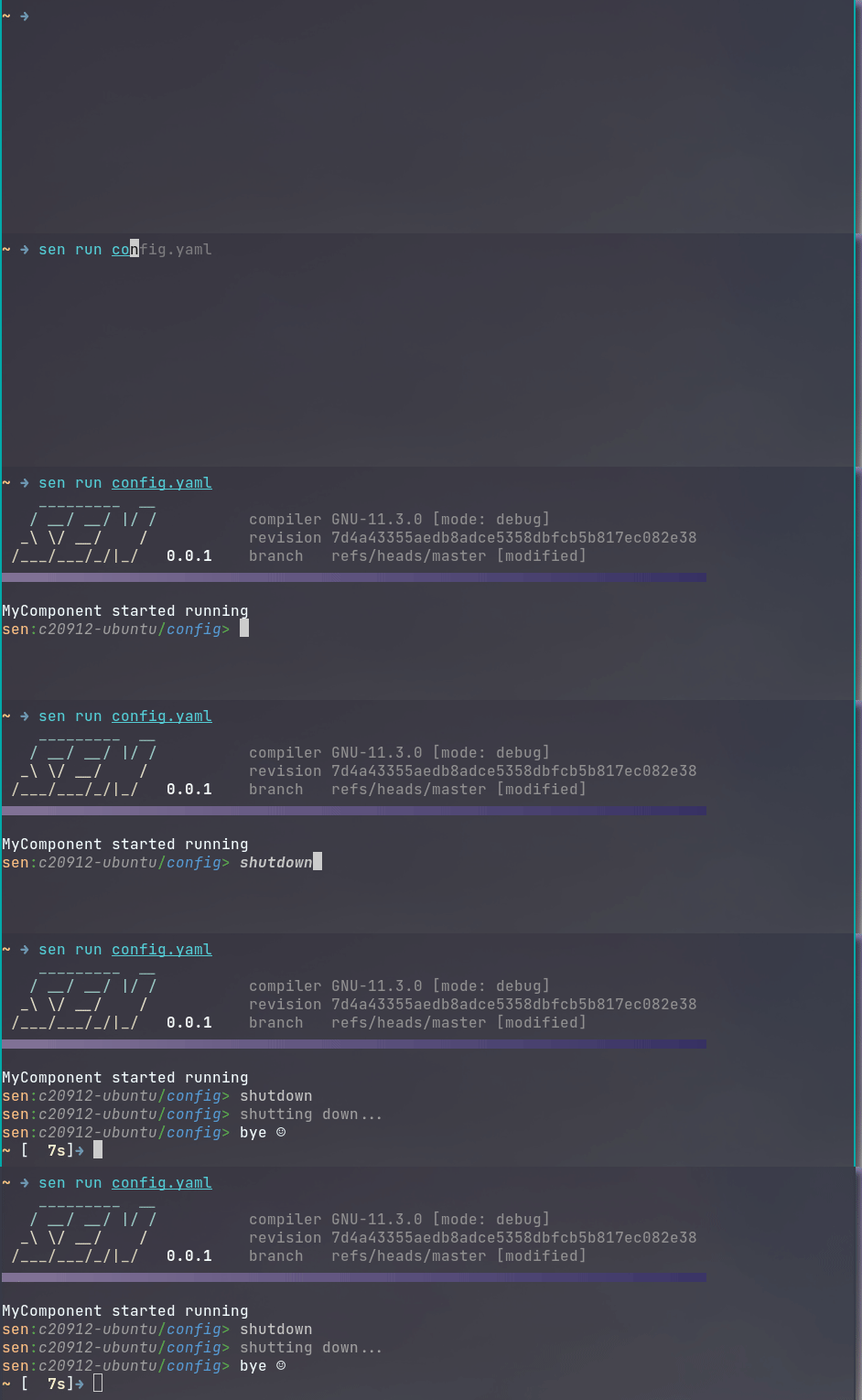
When Sen finishes without error it prints a  and returns zero. If it detects an error it can
handle, it prints a
and returns zero. If it detects an error it can
handle, it prints a  and returns non-zero. This is independent of any
component.
and returns non-zero. This is independent of any
component.
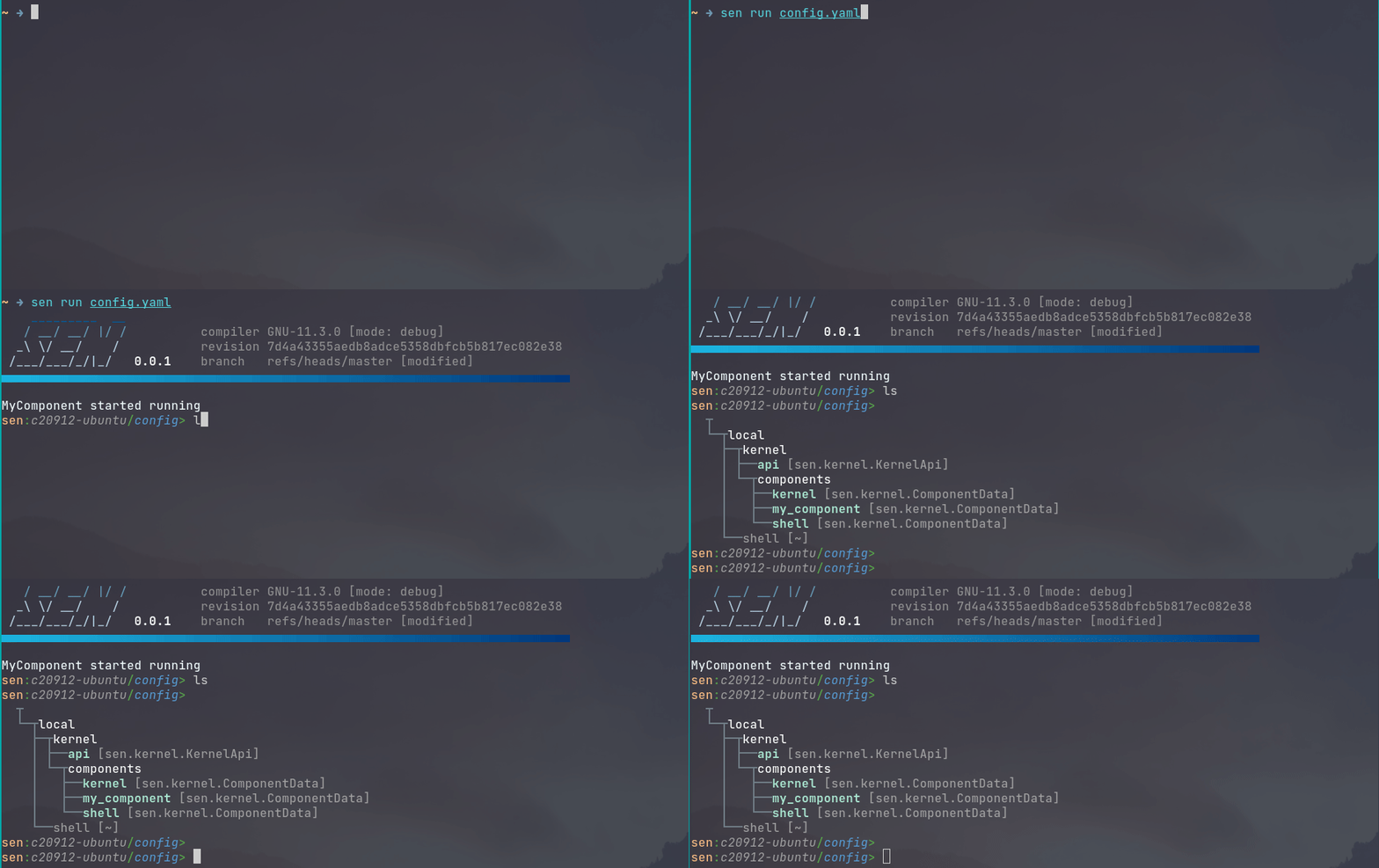
ls shows the objects currently published. The kernel publishes one per running component in the
local.kernel bus, so your component appears there without doing anything.
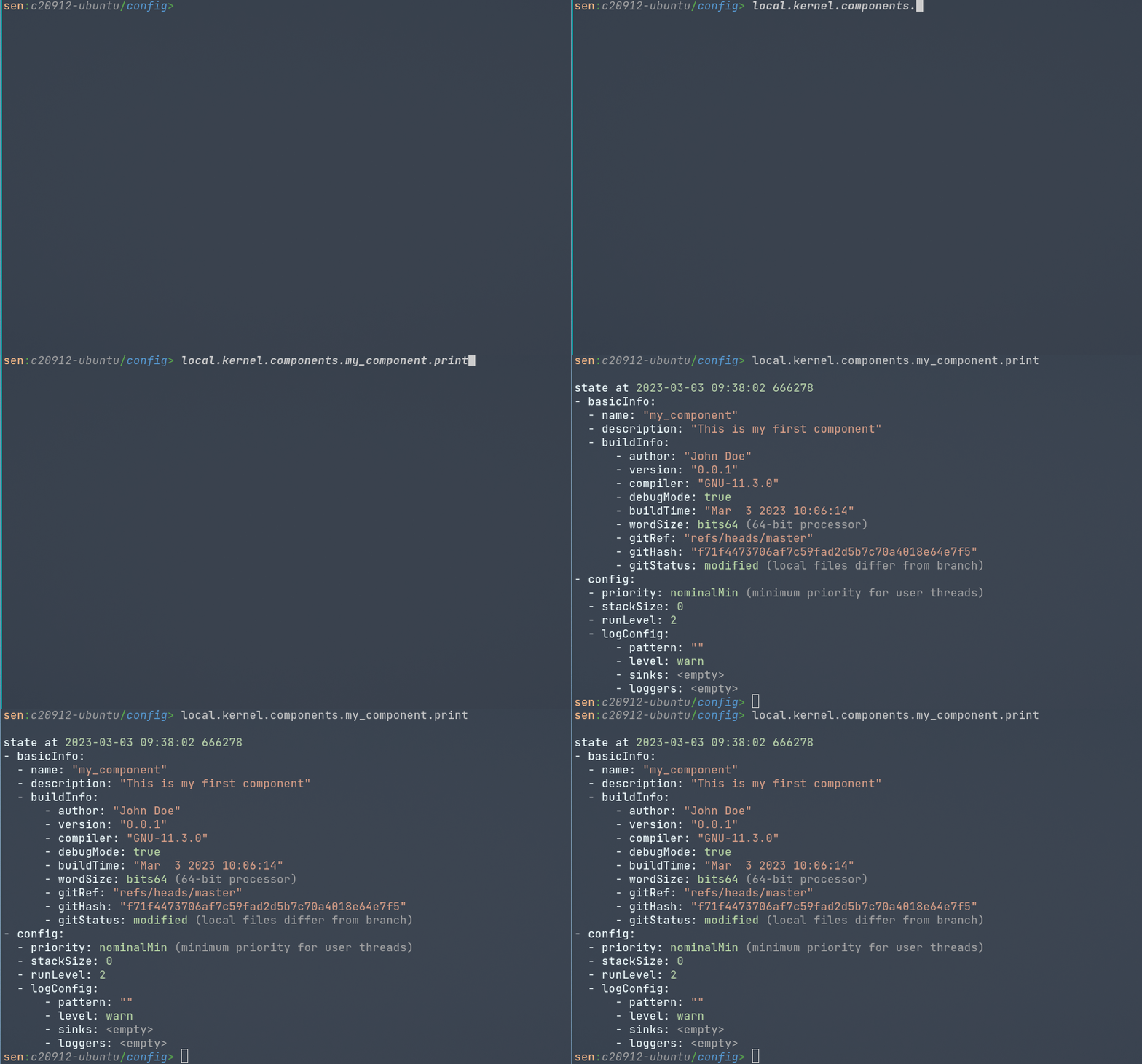
Inspecting that object shows the metadata baked into your binary at build time. Some comes from your
CMakeLists.txt, the rest from the build environment: git revision and status, compiler and flags,
word size. The config field holds what the kernel is using to run you.
The execution loop
The kernel does not call your component every cycle. You own the loop. Three calls drive it:
RunApi::drainInputs() takes in everything that arrived since last time, RunApi::update() runs
the update of every object your component registered, and RunApi::commit() publishes everything
that changed.
Written out, a loop looks like this:
while (!api.stopRequested())
{
  api.drainInputs();
  api.update();
  // ... do something, and probably sleep for a while ...
  api.commit();
}
Writing that in every component is tedious and easy to get wrong, so execLoop does it for you:
auto func = [](){ /* ... do something */ };
return api.execLoop(sen::Duration::fromHertz(1.0), std::move(func));
The cycle time is a Duration, constructed here from a frequency. Each cycle drains the inputs,
lets your objects update, calls func, then commits, so anything func stages is published by the
commit at the end of that same cycle. If you have nothing to do each cycle and only need to stay
responsive to others, leave it out:
The kernel learns your cycle time from execLoop. A component that drives the loop by hand never
tells it, so RunApi::getTargetCycleTime() gives its objects nothing. Objects built under build:
always have a cycle time, because the kernel's pipeline calls execLoop for them. If you drive the
loop yourself and your objects need the period, pass it to them.
Publishing with the time the data came from
commit() tags everything it publishes with Sen's execution time. For a component that bridges a
system keeping its own clock, that is the wrong time. The state was captured when that other system
captured it, which is earlier than the moment your component sends it on. Pass the time you want
instead:
api.drainInputs();
api.update();
// ... read the other system, which also tells you when its snapshot was taken ...
api.commit(snapshotTime);
A subscriber then sees the time the data came from.
The time applies to every object your component publishes in that commit, which suits a snapshot of a whole system. It also applies to the objects your component publishes itself, not only the ones carrying the bridged data. If your component works those out from the snapshot, that is correct, because they describe the same instant.
getTime() still reports Sen's time. Your component keeps its own cycle, and the other components
and the run mode are unaffected. Only the tag on the data changes.
Keep the time advancing, and use one clock to do it. commit() and commit(time) read their stamps
from different places. A component that alternates between them tags the same objects from two
clocks, and the times it publishes can then go backwards.
That matters because the stamp travels with the data. Sen compares it in one place. When the bus replays buffered updates to a subscriber that joined late, an update no newer than the state that subscriber already has is skipped. If your source clock pauses and its state has not changed either, that update has nothing new in it.
This is for a component that owns its loop. execLoop commits at the end of every cycle, so a stamp
set inside its work function is replaced by the one that cycle's own commit applies.
Finding other objects
A component discovers objects exactly the way an object does. RunApi inherits KernelApi, so
selectAllFrom<T>(), selectFrom<T>() and getSource() are all available inside run() with the
same signatures and the same rules about keeping the returned subscription alive.
That is covered in full, with worked examples, in Working with objects. There is nothing component-specific about it.
One detail that is specific to components: the objects the kernel publishes in local.kernel are
proxy objects, your component's own view of the real ones, and they are named with your
component's prefix. They are guaranteed not to change while you are running. The local session is
special in that its buses are never shared across a process boundary.