The MCP Gateway
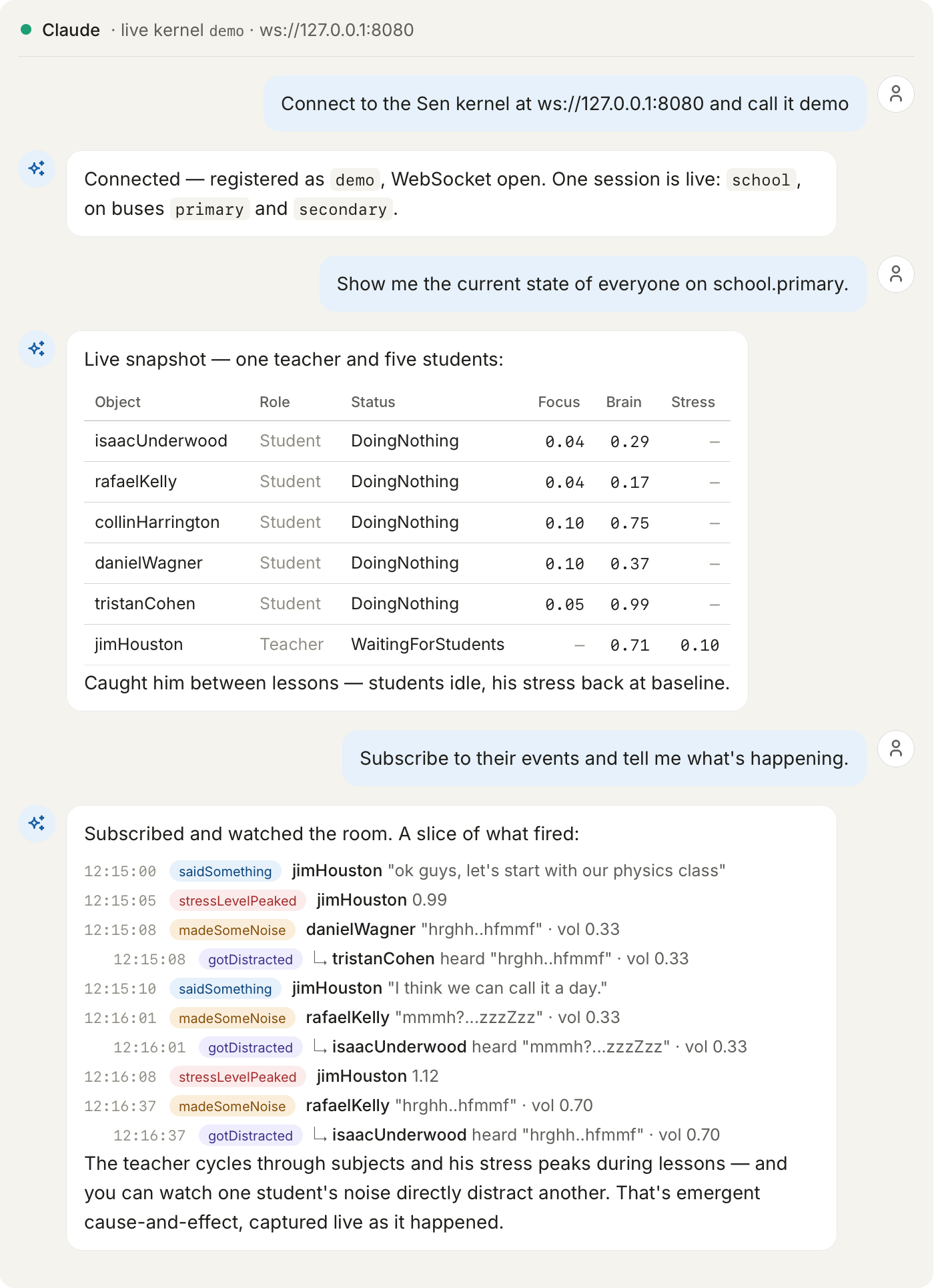
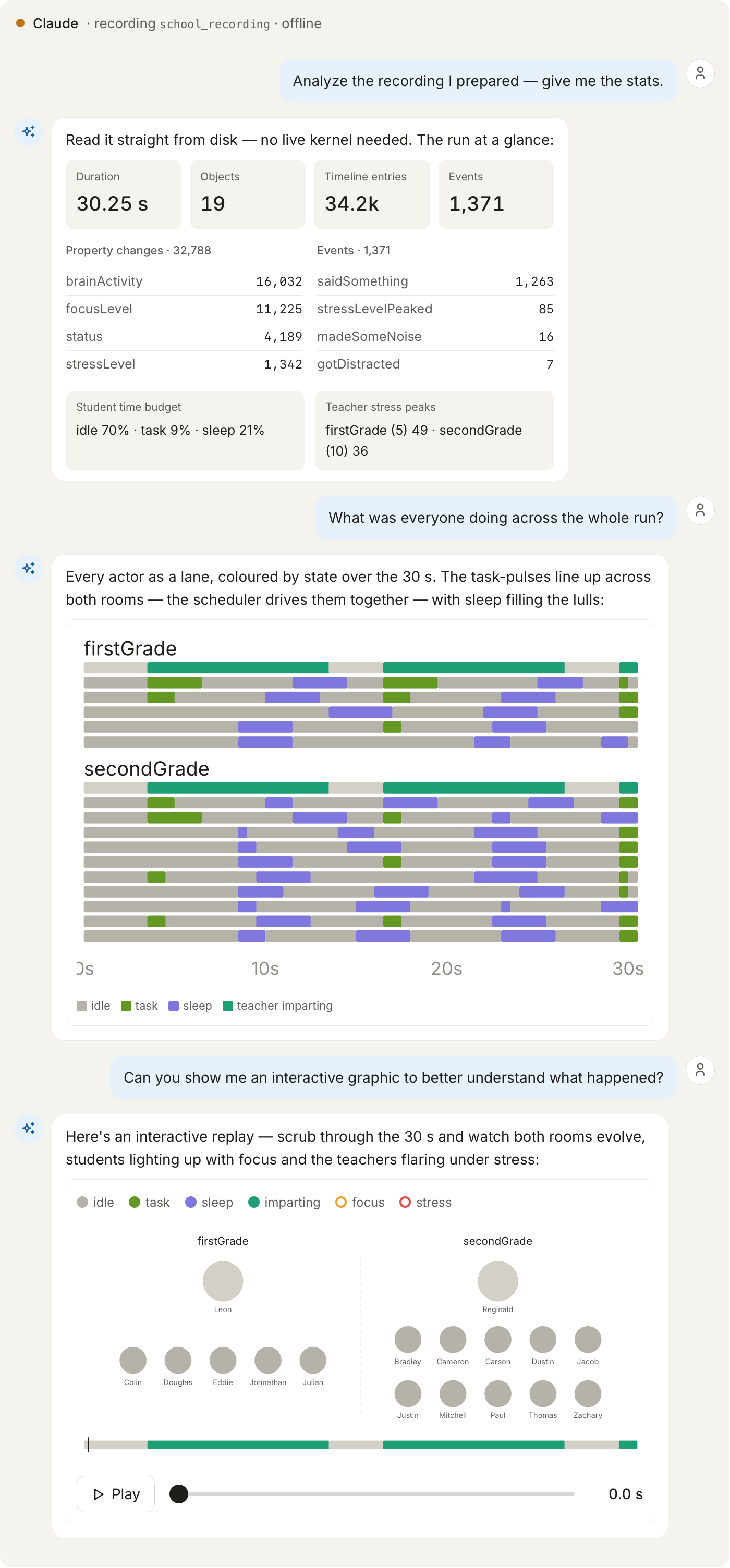
The MCP gateway lets a Large Language Model agent work against a running Sen kernel from its chat surface. It can browse the object graph, read and write properties, call methods, watch events, and open recordings.
Above, the same gateway against a live kernel and against a recording. Nothing in either was written for the example: the object names, the property categories and the event types all come from the kernel's own introspection.
One gateway, any Sen system
A Sen kernel already self-describes what it exposes, down to the JSON-Schema of every value. The gateway re-publishes that introspection over MCP and adds nothing of its own, so the same binary serves a fleet-monitoring kernel and a school simulation equally well.
There is therefore nothing to write per project. Point the gateway at a kernel and the agent
discovers whatever that kernel publishes. What does affect how well it reasons is your STL:
type names, class structure, and the [doc] annotations and /// comments that reach the
agent through getType.
What MCP is
If you have not used the Model Context Protocol before:
MCP is a small open protocol. A host application, usually the LLM's chat interface, spawns an MCP server as a child process and talks to it in framed JSON-RPC 2.0 over stdin and stdout. Neither side listens on a socket. What the server offers the host is tools, which are named callables with a JSON-Schema argument list, and resources, which are readable text at a URI.
This gateway is that server. It opens a WebSocket to each kernel's jsonrpc component and
re-publishes the object graph as tools, plus Sen's own documentation as resources under
sen://docs/, so you are not pasting reference material into the prompt.
When to reach for it
It is not a kernel component. Unlike jsonrpc, explorer, etc., the gateway does not
run inside a Sen process. It is an independent first-party app shipped with Sen, implemented
in TypeScript, packaged in apps/mcp_gateway/ alongside the C++ CLIs.
It is, however, the LLM-facing piece of the same external-access story as jsonrpc:
| Surface | Transport | Best for |
|---|---|---|
shell |
Local TCP, text protocol | Quick interactive poking from a terminal |
jsonrpc |
WebSocket + JSON-RPC 2.0 | Long-lived programmatic sessions, streaming notifications |
mcp_gateway (this app) |
MCP over stdio, fronts jsonrpc |
Letting an LLM agent observe and drive Sen |
What the LLM gets
On every MCP initialize the LLM receives a conceptual primer about Sen: the namespace
(<session>.<bus>.<object>), the four property categories, the type system, the execution
model, the query grammar, the interest lifecycle, and recommended operating habits. The primer
also tells the agent that it can pull more depth from the baked sen://docs/... resources
on demand.
Each tool then carries its own per-call contract in its MCP description. The LLM never needs to read C++ headers or guess SQL syntax: it discovers the live data through the tools and the documented behaviour through the primer plus the resources.
The tools fall into a few groups.
connectToKernel, listKernels and disconnectFromKernel manage connections by name, and one
gateway can hold several at once: a staging kernel and a production one, reasoned about in the
same session. Every other tool takes an optional kernel argument, which you can omit when only
one is connected.
Type introspection enumerates the registered types and fetches a CustomTypeSpec for any of
them: properties, methods, events, inheritance. An opt-in flag attaches the JSON-Schema
fragment too, which is what lets the model shape a write or a method argument without guessing.
Interests are standing queries over a bus, and they are the handle every per-object operation needs. Open one, list what it matches, release it when done.
Reads come in two shapes: a single property, or a batched call returning every property of every matched object, walking the inheritance chain. Values arrive parsed, so primitives are JS scalars, structs are nested objects and sequences are arrays.
Writes are setProperty, which accepts only RW categories, and invokeMethod. Both are
affected by read-only mode, described below.
Events are subscribed per event name and polled, since MCP carries no streams. There is a bulk unsubscribe for an entire interest.
Recording analysis lists recordings under a root you supply, fetches the sen_db_python
reference, and runs a script you write in a sandboxed python3 child.
For the precise inventory and per-tool argument shapes, ask the host's tools/list (MCP
hosts surface this directly) or read each tool's description in the gateway source. The
canonical contract is the description shipped with each tool, not this page.
STL docstrings matter
Whatever getType returns is what the agent believes. A property called s leaves it
guessing; stressLevel does not. A [doc] annotation on that property is quoted back to
whoever asked, so the difference between an agent inventing what focusLevel means and one
stating your team's intent is a line of STL.
Registering the gateway with an MCP host
A Sen install ships two launchers in ${CMAKE_INSTALL_PREFIX}/bin/, alongside the
sen-mcp-gateway.cjs JS bundle they run: sen-mcp-gateway for Linux and macOS, and
sen-mcp-gateway.cmd for Windows, where an MCP host cannot spawn the shell script. Both are
installed on every platform, so a tree built on one machine still works on another.
A launcher refuses to start when node is missing from PATH or is older than 22.20.0, and
says which of the two is wrong. That is a floor, not a range: package.json declares
>=22.20.0 to match, and a newer Node is fine. The bundle is built for node22, so it is an
older runtime that fails, somewhere inside a bundled dependency and with nothing pointing at
the version. Sen builds and tests against 22.20.0.
Conan consumers get the wrapper and Node from two different environments. Sen puts the wrapper
on PATH through its own run environment, which conanrun activates. Node comes from
tool_requires("nodejs/22.20.0") in your conanfile, which feeds the build environment that
conanbuild activates. Activating only conanrun gives you the wrapper without Node, and the
wrapper then fails to start.
The two pieces of host-side wiring you supply are:
- The command:
sen-mcp-gateway, or the absolute install path. On Windows, namesen-mcp-gateway.cmd. - The transport: stdio.
Register with any MCP-aware host. For example, with the Anthropic CLI:
Once registered, the LLM can call connectToKernel({name, url}) against any reachable Sen
WebSocket endpoint. No URL needs to be baked into the gateway's startup.
Two flags govern the build. The gateway is built when jsonrpc is on and
SEN_BUILD_MCP_GATEWAY is ON, which is the default; -DSEN_BUILD_MCP_GATEWAY=OFF skips it.
The gateway bundles the JSON-RPC TypeScript client, so it also needs
SEN_BUILD_JSONRPC_TS_CLIENT. Turning that one off while the gateway is on stops the
configure step with an error naming both flags. Separately, the build skips the gateway with a
message in the CMake output when npm is not on PATH, so a build that finds no npm
produces no gateway and no error.
Configuration
The gateway reads four environment variables; all are optional. Per-call inputs (kernel URLs, interest names, recording roots, etc.) are arguments to each tool call, not environment.
| Variable | Default | Purpose |
|---|---|---|
SEN_RECORDING_TIMEOUT_MS |
60000 |
Wall-clock cap (ms) for runRecordingScript python invocations. Accepts a positive number up to 600000. A value outside that range is not clamped and does not fall back to the default: the gateway reports an error at startup and every runRecordingScript call fails until the value is corrected. |
SEN_MCP_GATEWAY_READONLY |
unset | When set (1, true, yes, on), setProperty is rejected, and invokeMethod and the three recording tools are withdrawn from the advertised surface. Implies SEN_MCP_GATEWAY_NO_RECORDING. The reasoning is under Security model. |
SEN_MCP_GATEWAY_NO_RECORDING |
unset | When set, the recording tools (listRecordings, runRecordingScript, getRecordingDocs) are omitted from the advertised tool surface entirely. The live-kernel tools, including the write tools, are unaffected. |
SEN_MCP_GATEWAY_AUDIT_LOG |
unset | When set, append-only JSON-lines audit log file path. State-changing tool calls are recorded with the tool name, the kernel name, the names the call acts on, and the outcome (ok, failed, or denied). Property and method names are recorded without their values or arguments, and runRecordingScript records a SHA-256 hash of the script rather than the script. The kernel URL is reduced to scheme, host and port: userinfo, query string and fragment are dropped and their removal is marked, and a URL that cannot be parsed is withheld entirely. One entry is not reduced: declareInterest records the query text in full, because it is what the model asked to watch and is the question this log exists to answer. Falls back to stderr on write failure. |
Both flags accept 1, true, yes or on to enable and 0, false, no or off to
disable, in any case and ignoring surrounding whitespace; unset or empty reads as disabled.
Any other value is refused rather than guessed at: the gateway reports the variable, the
value and both accepted sets, and does not start. Defaulting an unrecognised spelling to
"off" would leave the write tools and the python child enabled on a gateway its operator
believes is restricted, and say nothing.
Either recording variable removes the same three tools at registration, so they never appear
in tools/list: SEN_MCP_GATEWAY_NO_RECORDING drops the advertised count by three, and
SEN_MCP_GATEWAY_READONLY by four, taking invokeMethod with them. No withdrawn tool is ever
present and refusing. setProperty is the exception and stays visible, because refusing every
write is a check that means exactly what it says, and a model told why it was refused behaves
better than one that cannot see the tool at all.
If a model invents a withdrawn name anyway, it gets the dispatcher's generic
unknown tool: runRecordingScript rather than anything about read-only mode, which is worth
knowing when a session that used to analyse recordings suddenly cannot find the tools. The
gateway writes one line to stderr at startup naming the variable responsible. When both are
set, that line names SEN_MCP_GATEWAY_NO_RECORDING.
Failed calls record the error's class name, never its message. Kernel error text can quote the
value that was rejected, which would put values back into a log that otherwise holds none. A
write refused by read-only mode is recorded as denied, so a blocked attempt still leaves a
trace.
The kernel URL is the entry most likely to become sensitive. Kernel authentication is not wired through the gateway yet, and when it lands, a credential carried in the URL would be written to the audit log verbatim. Give the log file the same protection you would give a credential store.
Security model and deployment
The gateway runs with the spawning user's full process privileges. It speaks MCP on stdio
and forwards tool calls to Sen kernels; the runRecordingScript tool additionally spawns
python3 with caller-supplied code as a child process.
In-process defenses
The gateway scrubs the environment passed to the python3 child (allowlist: PATH,
PYTHONPATH, HOME, LANG, LC_ALL, TZ, TMPDIR); credentials in the launching shell's
environment do not propagate. The child is spawned in its own process group. On Linux and
macOS the gateway signals that group, so SIGTERM and SIGKILL reach the child and every
grandchild still in it; a grandchild that leaves the group, for example by starting its own
session, survives. Windows has no process groups, so the gateway kills the child's process
tree instead. A survivor keeps running; what changed is that the gateway stops waiting on it.
A run is settled once the child exits, rather than once the pipes it left behind are closed,
so a stray grandchild can no longer hold a recording slot open for good.
The recording runner rejects a script larger than 64 KiB before it spawns anything. That is
the size of a pipe buffer, so a larger script would stall on the write to the child instead
of failing. It then caps stdout (64 KiB), stderr (16 KiB), and wall-clock duration (60 s by
default, see SEN_RECORDING_TIMEOUT_MS). The gateway caps each kernel at 64 concurrent
interests, and each interest's event buffer at 1000 entries or 8 MiB, whichever it reaches
first, so a chatty event cannot grow the process without bound. State-changing tool calls are
audit-logged (file or stderr per SEN_MCP_GATEWAY_AUDIT_LOG).
What the gateway does not constrain: filesystem read/write outside the recordings root,
network egress, or what python3 itself can do with the rest of the host. There are no
enforced CPU/memory/file-descriptor limits; those are the deployment layer's responsibility.
Recommended deployment
Run the gateway inside a container. A reference Dockerfile is provided at
apps/mcp_gateway/docker/Dockerfile. The container should:
- Run as a non-root user (the reference image does).
- Mount the recordings directory read-only (or read-write only as required) at the path the LLM will reference.
- Restrict network egress to the Sen kernel host(s).
- Drop privileges the gateway never uses:
--cap-drop=ALL,--security-opt=no-new-privileges, and a read-only root filesystem. - Apply resource limits via
docker runflags (--memory,--pids-limit,--ulimit nofile=...). - Provide the
sen_db_pythonbindings if the recording tools will be used. Every script the LLM writes starts withimport sen_db_python, so apython3without the bindings fails on the first line.
For higher-trust deployments, narrow the tool surface with the environment variables above.
They are not two independent choices. SEN_MCP_GATEWAY_NO_RECORDING=1 removes the three
recording tools, so no python child is ever spawned. SEN_MCP_GATEWAY_READONLY=1 removes
those same three, withdraws invokeMethod and refuses every property write, so it implies the
first and setting both adds nothing. Use read-only when the agent should only observe, and
no-recording when it should still drive the kernel but never run Python.
Read-only withdraws invokeMethod outright rather than allowing methods marked constant,
because that attribute does not carry the meaning the decision needs. constant promises a
method does not modify its own object; it promises nothing about what else the method does.
Sen's own shell declares fn shutdown() [const], correctly, since it touches no member of the
Shell object, and calling it stops the kernel. An agent in read-only mode keeps the
reads it needs: getTypes, getType, listObjects, getProperty and getObjectsState are
tools in their own right and are unaffected.
Running in a container
Build the reference image:
Register the containerized gateway with an MCP host. For example, with the Anthropic CLI:
claude mcp add sen-mcp-gateway --transport stdio -- \
  docker run --rm -i \
    --memory=512m \
    --pids-limit=128 \
    --ulimit nofile=256 \
    --cap-drop=ALL \
    --security-opt=no-new-privileges \
    --read-only \
    --tmpfs /tmp \
    -v /path/to/recordings:/recordings:ro \
    --network=sen-kernels \
    sen-mcp-gateway
The MCP host attaches the container's stdio. The LLM then calls connectToKernel with the
kernel WebSocket URL (ws://...) as usual.
sen-kernels stands for a user-defined Docker network that holds the kernels and nothing
else. Put the gateway on it so the container can reach the kernels and no other host.
--network=host also reaches a kernel on the host, but it gives the container the whole host
network, which undoes the egress restriction above. --read-only needs --tmpfs /tmp so the
python child keeps a scratch directory; add a writable mount if you point
SEN_MCP_GATEWAY_AUDIT_LOG at a path inside the container. The --memory, --pids-limit,
and --ulimit flags backstop the gateway's in-process caps with kernel-enforced limits.
Running outside a container
Supported for local development. In this mode, runRecordingScript executes arbitrary
Python with the launching user's permissions and can read/write any file the user can.
Do not point a gateway running outside a sandbox at untrusted recordings, untrusted Sen
kernels, or LLM hosts in shared contexts.
Kernel authentication
The gateway connects to Sen kernels via @sen/client without authentication (the jsonrpc
component's default is NoAuth). This is fine for localhost / trusted-network deployments.
A pluggable auth seam exists in the jsonrpc component but is not currently wired through
the gateway. Use only with trusted kernel endpoints until kernel auth lands.
Resources
The gateway publishes a curated subset of Sen's documentation as MCP resources under the
sen://docs/ URI scheme: the conceptual user-guide pages, per-component overviews (this page
included), and a few key how-to guides. The bundle is baked into dist/ at build time, so the
gateway does not need network access at runtime; the source folders and the sanitization pass
live in apps/mcp_gateway/scripts/bake_docs.mjs. The host's resources/list capability lists
them; resources/read fetches one.
The initialize.instructions block (in apps/mcp_gateway/src/instructions.ts) gives the LLM
the conceptual primer once per connect; the resources are reference material it can pull on
demand.
Trying it live with the school example
Sen ships a school example (examples/config/4_school/) that exercises the gateway
end-to-end, with rich properties, methods and events across two buses.
In one terminal, start Sen with the JSON-RPC variant of the school config:
In another, register the gateway with an MCP host (the Anthropic CLI is one option):
Then, from the host, prompts such as the following exercise the surface end-to-end:
- "Connect to the Sen kernel at
ws://127.0.0.1:8080." - "List the sessions and buses."
- "Show me every student in
school.primaryand read theirfocusLevel." - "Ask the teacher in
school.primarytoassignTasks, then watch for anystressLevelPeakedevent over the next 30 seconds." - "Explain the
school.Studentclass to me, so I know how to read itsstatusproperty."
Architecture
The gateway is a pure Node process. It speaks MCP on one side (stdio with the host) and
@sen/client on the other (WebSocket to each Sen kernel's jsonrpc component). It does not
run inside a Sen process and has no C++ side.
MCP host (LLM-facing)
   |  stdio  (JSON-RPC 2.0 framed by the MCP SDK)
   v
sen-mcp-gateway  (this process)
   |  WebSocket  (one per connected kernel)
   v
Sen kernel A      Sen kernel B      ...
(`jsonrpc`)       (`jsonrpc`)
The contributor-facing overview of layers, dispatch, the audit log, the recording sandbox and
the bake-docs-into-resources pattern lives in
apps/mcp_gateway/architecture.md, alongside the source-layout README at
apps/mcp_gateway/README.md.