The web explorer
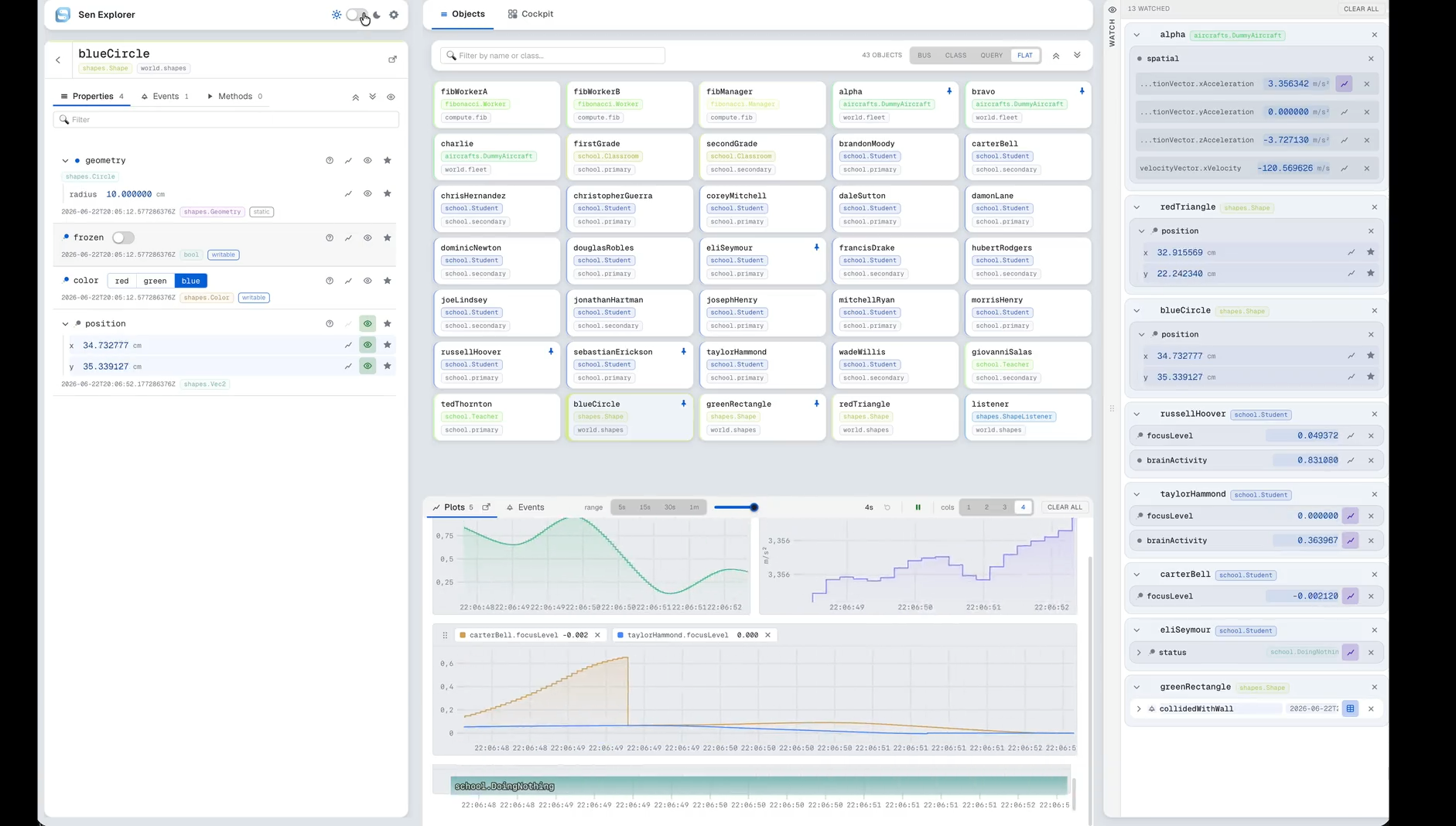
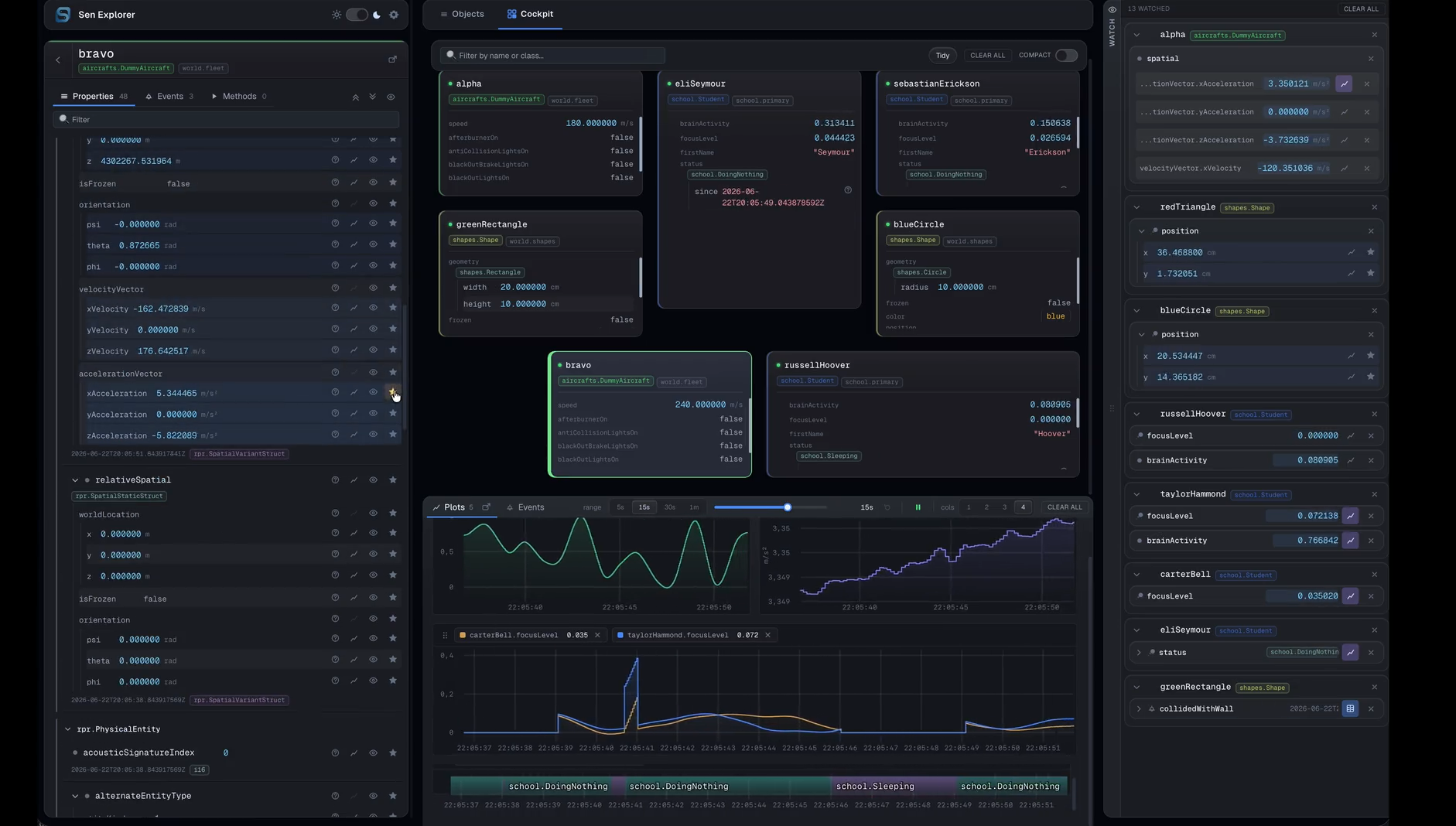
The webexplorer component serves a browser-based UI for inspecting and interacting with a running
Sen process. Point any modern browser at the JSON-RPC endpoint, and you get a live view of every
session, bus, and object the
process is publishing.
Loading webexplorer does not by itself open any port: the UI is delivered by the
jsonrpc component's static-file server, and the same WebSocket also carries
the live data the page consumes. The browser only ever talks to one origin (the JSON-RPC
endpoint), so deployment is "one Sen process, one URL".
What you can do with it
- Browse the live topology. Sessions, buses, and the objects matched by each named query, refreshed as the process publishes them.
- Author named interests against any bus and reuse them across sessions. Queries persist; the Nav remembers them for next time.
- Inspect any object's properties with type-aware rendering for structs, sequences, variants, and units; edit writable properties in place with typed editors.
- Invoke methods with a typed argument editor and see the return value rendered the same way as properties.
- Watch events stream into a unified bottom drawer and into per-class tables with resizable columns, source filtering, and a live row-arrival highlight.
- Plot numeric leaves on a multi-series board: drag series between panels, share a cursor across panels, brush-zoom, pause/resume, scrub through a retention-bounded history. Pop the board out to a second monitor.
- Pin objects to a Cockpit for at-a-glance monitoring of the handful of instances you care about, with a class-grouped Overview to navigate dense topologies.
- Save layouts. Panel arrangement, column widths, retention windows, pinned set, and
open queries all round-trip through
localStorage; reload picks up where you left off.
Running the component
Try it standalone
The Sen tree ships a self-contained showcase config that stands up jsonrpc +
webexplorer alongside a small heterogeneous object graph (classrooms, aircraft fleet,
shapes, fibonacci workers) picked to exercise every workspace in the UI. From a built
Sen tree (see Getting Sen; a full-mode build bakes the
frontend bundle into the webexplorer component automatically):
Open http://127.0.0.1:8080/explorer/ in any browser. The Nav on the left lists the
buses; open one, declare a query, and you have something to inspect. Nothing else needs
to be installed in the browser.
The smaller examples/config/14_jsonrpc/3_explorer.yaml loads just jsonrpc and
webexplorer with no domain content -- useful as an "is it serving?" smoke test (the
UI comes up but the topology is empty).
Adding it to your own Sen
Drop the two components into any existing Sen config:
load:
  - name: jsonrpc
    group: 3
    address: 127.0.0.1
    port: 8080
  - name: webexplorer
    group: 3
Then start Sen and open http://127.0.0.1:8080/explorer/ in any browser. The explorer
picks up whatever sessions, buses, and objects the rest of your config publishes; no
per-class configuration on the webexplorer side.
webexplorer requires jsonrpc running on the same process and the same controlBusName
(both default to jsonrpc_control on local, so a plain webexplorer block with no
configuration is enough). The component's only configuration knob:
| Field | Default | Notes |
|---|---|---|
controlBusName |
"jsonrpc_control" |
Must match the controlBusName configured on jsonrpc. |
If multiple jsonrpc static-file servers happen to be on the same bus, only the first one
sees the bundle registration; the rest are logged as errors and ignored. Configure exactly
one StaticFileServer per control bus -- registration order across reloads is otherwise
non-deterministic.
Layout
A three-pane shell with a bottom drawer:
- Nav (left): topology (sessions, buses) and saved interests. Multi-select source picker for cross-bus interests.
- Detail (center): per-object Properties (with inline editors), Methods (named-arg invocation with typed inputs), and Events (live tail and per-type tables). Two extra tabs alongside (Overview and Cockpit) surface pinned-object collections across instances.
- Workspace (right): Watches drawer (pin a property to a sticky set) and a Plots board with multi-series panels, two unit axes, brush zoom, synced cursor, retention slider, and a pop-out window for a second monitor. The first distinct unit in a panel takes the left axis and the second takes the right; a third one shares the left axis, so a panel mixing more than two units has an axis spanning unlike scales. The popped-out plots are layout-locked (rearrange in the main window); per-chart pan and zoom still work.
- Bottom drawer: unified Events stream + per-type event tables with column resize and source filtering.
Saved layouts (panel arrangement, column widths, retention windows, the Cockpit's pinned
set) round-trip through localStorage; named queries persist the same way. Light and dark
themes ship; the switcher is in the sidebar header, next to the settings button.
Built on @sen/client
The page is a thin reactive skin over the @sen/client TypeScript library; no Sen-specific
schema is hard-coded anywhere in the UI. Every type, property, and unit is discovered at runtime
through the JSON-RPC type catalog. That makes the web explorer a useful
reference for any other web UI you'd build on top of @sen/client. The contributor-facing
one-page mental model is at components/webexplorer/frontend/architecture.md in the
repo, alongside per-side READMEs at components/webexplorer/{frontend,backend}/README.md.
Offline behavior
The web explorer is a single self-contained index.html baked into the component (no runtime
CDN fetch, no telemetry). The only network connection the page makes is to the WebSocket on its
origin. When that connection drops, the UI dims and shows a Retry affordance; live state
(plots, event tail, watches) is preserved on reconnect.